How to fix a mouse scroll wheel that jumps or stops working
A jumpy wheel almost always means a dirty or worn encoder. Clean it first. If the fault comes back, a new one costs about $2.
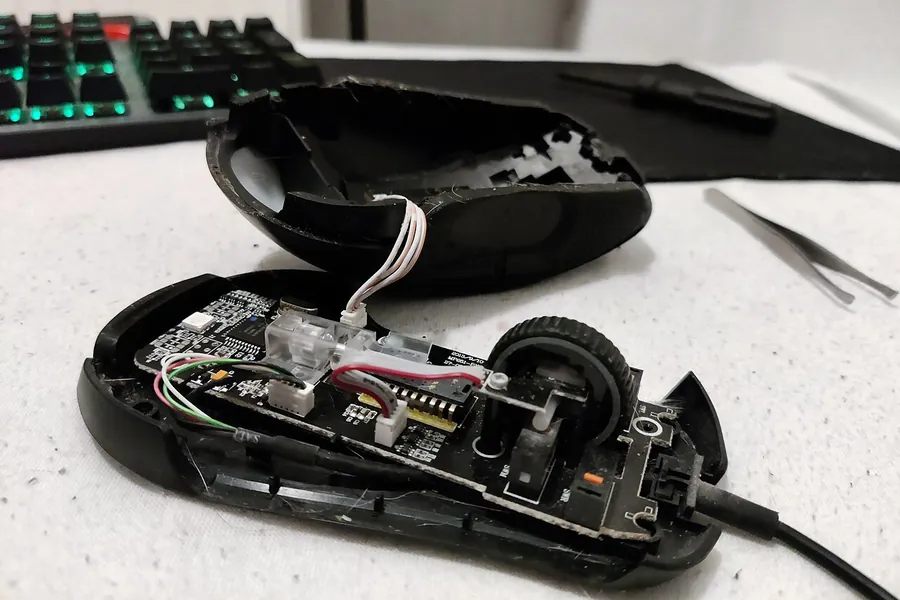

To fix a mouse scroll wheel that jumps up and down, clean the encoder first, and replace it if the fault comes back. The encoder is the small part under the wheel that turns rotation into scroll steps. In most mice it is mechanical, with metal contacts that collect dirt and wear down. A new one costs $1.20 to $2.80, if you can solder.
Why a mouse scroll wheel jumps up and down
Inside a mechanical encoder, two metal tabs press on a notched wheel. Each notch closes and opens a contact, and the mouse reads the two signals, slightly out of step, to tell up from down. If a contact bounces, wears or has dirt under it, the signals arrive in the wrong order. The mouse reads a step backwards and the page jumps up.
Igor's Lab names the usual suspects: corroded tabs, dust and worn material between the tabs and the wheel, worn notches and tired springs. It puts a mechanical encoder's life at under about a million cycles. Firmware filters out some of the bouncing, so a cheap encoder or a lazy filter shows the fault sooner.
To make sure it's the wheel, scroll down a long page one notch at a time, or try the mouse on another computer. If some notches still kick the page back up, it's the encoder. A wireless mouse that only loses its scroll far from the receiver has a battery or connection problem instead.
Fix a jumping scroll wheel without opening the mouse
Try compressed air first. It's cheap and sometimes enough.
- Unplug the mouse, or switch it off.
- Blow short bursts into the gaps on both sides of the wheel while you spin it both ways. Hold the can upright.
- Test it again on a long page.
If the jumping is back within days, the dirt is on the contacts themselves or they are worn, and the mouse has to come apart.
Open the mouse and clean the encoder
Check the warranty first. Opening the mouse can void it, and a wheel that jumps while the mouse is still covered is worth a claim.
What you need
- A small screwdriver. For the screws, which often sit under the feet or a label.
- A thin plastic tool. To lift the feet and the label without tearing them.
- Isopropyl alcohol. A few drops, for the encoder's contacts.
- Contact cleaner, if needed. Such as DeoxIT D5, for oxidized contacts.
- A toothpick. To turn the encoder's shaft while the alcohol works in.
Lift the feet or the label with the plastic tool to get at the screws. Inside, lift the wheel out of the encoder, then:
- Drip a little isopropyl alcohol into the openings of the encoder's housing.
- Turn the encoder's shaft back and forth with a toothpick or a small screwdriver to work it in.
- Let it dry completely before the mouse gets power again.
Alcohol clears dirt and grease, but it doesn't dissolve oxidation on the contacts. For that, the usual fix is a contact cleaner such as CAIG's DeoxIT D5, which CAIG says dissolves the oxides and sulfides that form on metal. Use it the same way, a little at a time.
Replace the scroll wheel encoder
No cleaner can undo wear, so if the jumping returns after a cleaning, the encoder is worn out. Replacements from TTC, Kailh and ALPS sell for $1.20 to $2.80 at retail, and you don't need the same brand as the one you take out.
You do need the same height. It's measured from the base of the mounting plate to the center of the axle hole, and many encoders have it stamped on the front, so a "9" is a 9 mm encoder. Heights run from 5 to 14 mm, and the wrong one leaves the wheel sitting too high or too low in its slot.
The rest has to match too. A standard mouse encoder has three pins, but their order isn't fixed: some run A-C-B and others C-B-A, so line the new one's pins up with the old one's. Hold the two side by side and check that the wheel's axle fits the new encoder's hole the same way.
Fitting it means desoldering the old encoder and soldering in the new one. It takes a soldering iron, a desoldering pump and some practice, the same kit as replacing a click switch. If you have never soldered, a mouse you were about to throw out is a good one to learn on.
When a new mouse makes more sense
If it's under warranty, send it back. If it's old, cheap or glued shut, your time is better spent picking a new one.
The new one will most likely have the same kind of encoder. In our catalog, 1,252 mice list a mechanical encoder, 45 an optical one and 23 a magnetic one. An optical encoder counts steps with light and has no contacts to wear. Igor's Lab rates it at up to 100 million cycles, although dust or a hair in the light path can still confuse it. Razer's Viper V4 Pro and DeathAdder V4 Pro both use one, and RTINGS expects it to last longer than the mechanical encoders in earlier models.
Still, if you're buying anyway, the shape will matter to you more than the encoder. The finder shows the shells that fit your hand size and grip, and the lists for medium hands, claw grip and palm grip are a quick place to start.
Questions
Can a mouse scroll wheel be repaired?
Yes, in most mice. Cleaning the encoder fixes a dirty one, and a worn one can be swapped for a couple of dollars if you can solder.
Why does my scroll wheel jump the opposite way?
A dirty or worn contact in the encoder makes its two signals arrive in the wrong order, so a step down registers as a step up. Cleaning deals with dirt; worn contacts need a new encoder.
Can I fix a scroll wheel without opening the mouse?
Sometimes. Compressed air around the spinning wheel clears loose dust. If the jumping returns within days, the encoder has to be cleaned or replaced from the inside.
Sources
- How scroll wheel encoders work and failigorslab.de
- Scroll wheel encoders (TTC, Kailh, ALPS), prices and heightsshop.facfox.com
- Razer Viper V4 Pro review: optical scroll encoder in place of the mechanical one, for better long-term durabilityrtings.com
- Razer DeathAdder V4 Pro review: optical scroll encoder for better long-term reliability than past mechanical onesrtings.com
- DeoxIT D-Series: dissolves oxides and sulfides on metal contactscaig.com
- Any regular 3-pin encoder works if the height matchesus-support.pulsar.gg
- Encoder pin order not standardized (A-C-B or C-B-A)insider.razer.com