How to fix mouse double clicking on a single click
A minute with a click tester tells you whether it's a setting or a worn switch. Then claim the warranty, fix the switch or replace the mouse.
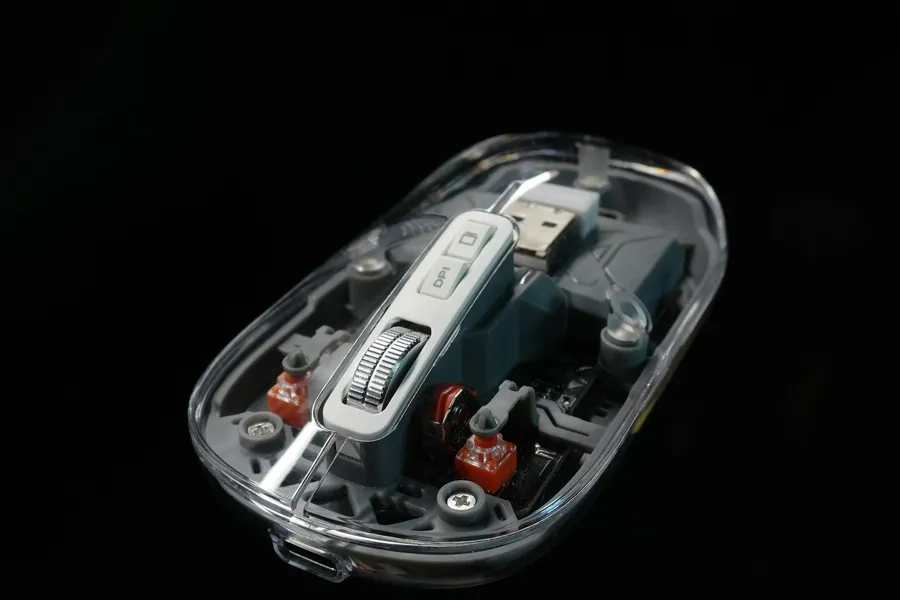
To fix mouse double clicking, first rule out the computer: run a click tester, check two settings and try the mouse on a second PC. If it still double clicks there, the switch under the button is worn. Claim the warranty if you can (Razer's lasts two years), otherwise replace the switch, which costs about a dollar, or move to a mouse with optical switches.
Test it first
Open a click tester, such as Redragon's free mouse tester, which flags any two clicks that arrive within 50 ms of each other. Click normally for a minute. A healthy switch gives you one click per press.
Then plug the mouse into a different computer, without a hub or extension cable in between (Logitech's support suggests both steps). If the double clicks follow the mouse, it's the hardware. If they stay with the first computer, look at the settings below.
Two settings that look like a double click
Double-click speed. This one never turns a single press into two. If the speed is set too slow, though, two separate clicks close together open a file as if you'd double clicked.
- Windows 11: Settings > Bluetooth & devices > Mouse > Additional mouse settings, then the Double-click speed slider.
- Windows 10: Settings > Devices > Mouse > Additional mouse options.
- Mac: System Settings > Accessibility > Pointer Control, then Double-click speed.
Single click to open. If files and folders open with one click, the mouse may be fine. In File Explorer's folder options, check that "Double-click to open an item" is selected.
If your mouse has its own software, also look for a setting called debounce time. A switch's contacts bounce as they close, so after a press the mouse ignores new ones for the debounce time, and many mice also wait out that time before they send the click. In Glorious CORE it's on the Performance tab. Raising it can hide a worn switch for a while, at a price: Optimum Tech, a YouTube channel that measures mouse latency, describes debounce as a feature that forces a delayed signal on the mouse to avoid double-clicking. On a mouse that waits, the longer you set it, the later every click arrives.
Why does my mouse keep double clicking?
Most mouse buttons press a small mechanical switch, two metal contacts that touch when you click. Omron, which makes many of them, says plainly that mechanical contacts always chatter, bouncing as they close, and the debounce time hides that.
As the switch ages, its spring tires and its contacts wear or corrode. The bounce outlasts the debounce time, and one press is read as two. iFixit describes worn left and right micro-switches as a common fault after a couple of years of use.
Optical switches avoid this. Razer's version uses a beam of infrared light instead of touching contacts, so it needs no debounce time, and Razer rates its Gen-4 version for 100 million clicks. They're still the minority: in our catalog, 975 mice list mechanical switches and 393 optical ones.
Can you fix mouse double clicking?
Usually, yes. Try these in order, from no tools to a soldering iron.
- Claim the warranty first. Razer covers mice for two years, and Logitech lists each product's period on its package or product page. Both exclude normal wear and tear, so ask support whether they treat a double click as a defect. Logitech's double-click page tells you to contact support if the fault follows the mouse to another computer, but it also says every mouse that works with the old Logitech Gaming Software is now out of warranty.
- Re-tension the spring. iFixit's Logitech M720 guide says the fault can often be fixed by bending a small spring inside the switch housing. You have to open the switch, and it's fiddly.
- Replace the switch. The switch is soldered to the board. iFixit rates the job as difficult and lists a soldering iron and a desoldering pump. A replacement switch costs about a dollar at retail: Mechkeys sells three Kailh GM 8.0 switches for $3 and lists them at over 80 million clicks.
The same skills fix a mouse scroll wheel that jumps, another part that wears out with use.
When a new mouse makes more sense
If it's out of warranty and glued shut, or you don't want to solder, a new mouse is the better use of your time. Look for optical switches, which in practice means a gaming mouse. They click differently from mechanical ones, so if you can, try one before you buy. Of the office mice in our catalog, 136 list mechanical switches and one lists optical, a trackball. Another MX Master or similar office mouse will have mechanical switches again, so check how long its warranty runs.
If a gaming shape suits you, optical switches start at $27 in our catalog, though the typical one costs $99. Why gaming mice are so expensive covers what else the price pays for. These four are worth a look, cheapest first:
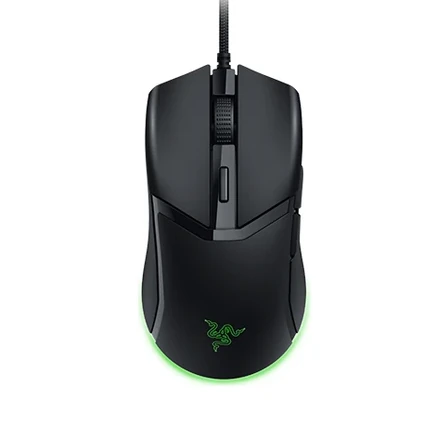
- Weight
- 58 g
- Size
- 119.6 × 62.5 × 38.1 mm
- Connection
- Wired
About $40 and wired only. The Cobra HyperSpeed is the same shape with wireless, for about $100.
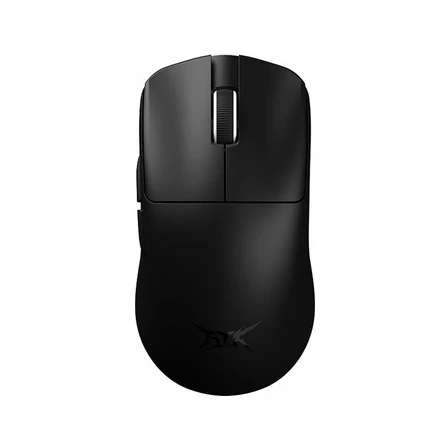
- Weight
- 45 g
- Size
- 118.2 × 62.4 × 38.8 mm
- Connection
- Wireless
At 118.2 mm it suits a small or medium hand; for a big hand in a palm grip it runs short. It's also the cheapest wireless one here, about $40 for 45 g.
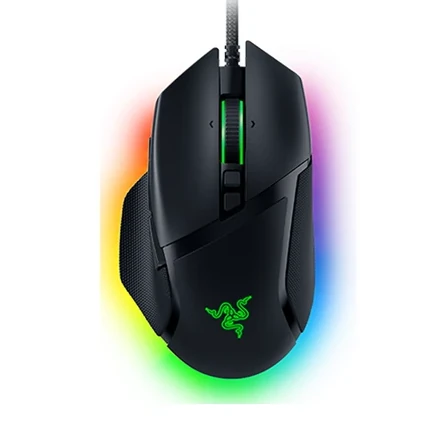
- Weight
- 101 g
- Size
- 130 × 75 × 42 mm
- Connection
- Wired
The closest to an office mouse of the four: a thumb rest, three side buttons and a 130 mm shell, about the finder's length for a big hand. It's wired and weighs 101 g.
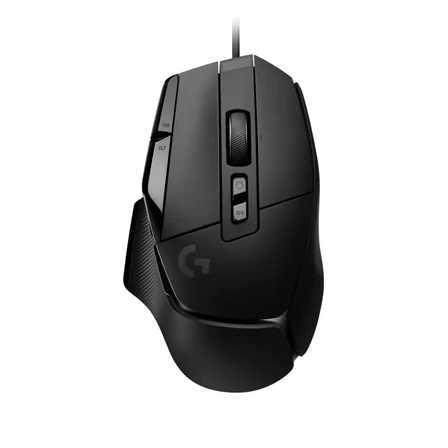
- Weight
- 89 g
- Size
- 131.4 × 79.2 × 41.1 mm
- Connection
- Wired
Logitech puts an optical switch under a mechanical click and says this removes the wear points that cause double clicking. The plain G502 X is wired and costs about $100, while the Lightspeed and Plus versions add wireless for about $160.
Whatever the switch, the shape decides whether the mouse is comfortable. The finder ranks mice by how well they fit your hand and grip, and you can narrow the list by budget.
Questions
How do I test my mouse for double clicking?
Use an online click tester and click normally for a minute. If it records two clicks for one press, the mouse is double clicking. Try it on a second computer to rule out the settings.
Why does my mouse double click on a single click in Windows 11?
Usually the switch is worn. Two settings can look like it: a slow double-click speed makes two quick clicks count as one double click, and a folder option opens items on a single click. Check both, then try the mouse on another computer. If it double clicks there too, it's the switch.
Do optical switches stop double clicking?
They remove the usual cause. An optical switch has no metal contacts to bounce or wear, so there's no chatter for the mouse to misread as a second click.
Sources
- Change mouse settings in Windowssupport.microsoft.com
- Change mouse settings on Macsupport.apple.com
- Gaming mouse double clicks when clicked oncesupport.logi.com
- Omron FAQ on switch chattering (via DigiKey)forum.digikey.com
- Debounce time in Glorious COREgloriousgaming.com
- Wired vs Wireless Gaming Mouse Latency (video): a 10 ms default debounce put the Model O Wireless near the bottom on click latencyyoutube.com
- Optical mouse switchrazer.com
- Logitech M720 micro-switch replacementifixit.com
- Mouse testerredragonshop.com
- G502 HERO vs G502 X and optical switcheslogitechg.com
- Kailh GM 8.0 micro switchmechkeys.com
- Warrantyrazer.com
- Limited hardware warrantylogitech.com